Uncensored AI
with one API key.
Three models that don't refuse. Built for Cursor Agent. Pay as you go from $1.
Get startedcurl https://77thjunction.app/v1/chat/completions \
-H "Authorization: Bearer sk-77j-YOUR_KEY" \
-H "Content-Type: application/json" \
-d '{
"model": "junction-titan",
"messages": [
{"role": "user", "content": "Write a haiku about midnight code"}
]
}'export async function handler(req) {
const body = await req.json();
// TODO: validate input
return Response.json(body);
}
Done. Bad input now returns 400 with a clear message, and all 6 tests pass.
Agent mode, no refusals.
junction-titan in Cursor
With 77th Junction you can ↳
77th / junction-titan
Strongest · coding & agent · 1M context
77th / junction-forge
Coding & agent · 1M context
77th / junction-swift
Fast · reads images · 262K context
Models that do the work instead of lecturing you
Mainstream assistants stop mid-task to refuse security research, reverse engineering, dark fiction or frank questions. Ours keep going, and they plug straight into the tools you already use.
Cursor's agent, unrestricted
Keep Cursor's agent harness. Swap in a model that doesn't refuse.
Cursor's Agent mode is the best coding harness around: it plans the work, reads your repo, edits across files, runs commands and checks its own output. The only thing holding it back is a model that stops to lecture you. Point Cursor at 77th Junction and you keep every tool, with a model that finishes the job.
1–3Cursor Settings → Models
Models
Choose which models appear in the chat model picker.
API Keys
4Chat → Agent → junction-titan
export async function handler(req) {
const body = await req.json();
// TODO: validate input
return Response.json(body);
}
- 1Click + Add Custom Model and add
junction-titan,junction-forgeandjunction-swift. - 2Paste your
sk-77j-…key into OpenAI API Key. - 3Switch on Override OpenAI Base URL, paste
https://77thjunction.app/v1and click Verify. - 4Open the chat, choose Agent and pick a junction model.
Agent mode
Plans multi-step tasks and keeps going until the work is done, not until it hits a policy wall.
Multi-file edits
Applies diffs across your whole repo, with every change shown for review.
Terminal
Runs builds, tests, installs and scripts, then reads the output and fixes what broke.
Codebase search
Semantic and exact search across the project, so answers are grounded in your code.
MCP servers
Your databases, browsers and internal APIs become tools the agent can call.
Rules and AGENTS.md
Project conventions and instructions the model follows on every request.
Checkpoints
Roll back any step the agent took if you don't like where it went.
@ context
Mention files, folders, docs and terminals to steer exactly what it reads.
Which model to pick in Cursor
Your base URL for step 3
https://77thjunction.app/v1How it works
Create an account, top up, and paste one key into Cursor. Everything else is the OpenAI API you already know.
Connect Cursor
Paste your key into Cursor's OpenAI settings, point the base URL at us and add the three model names. Then pick one in Agent mode.
Cursor Settings → Models

OpenAI API Key      sk-77j-••••••••••••
Override Base URL   https://77thjunction.app/v1
Custom models       junction-titan
                    junction-forge
                    junction-swift
Call it from code
Any OpenAI SDK works. Change the base URL and the key; streaming, tool calling and JSON mode pass straight through.
from openai import OpenAI

client = OpenAI(base_url="https://77thjunction.app/v1", api_key="sk-77j-…")
reply = client.chat.completions.create(
    model="junction-titan",
    messages=[{"role": "user", "content": "…"}],
)
See every cent
Each request lands in your usage log within seconds: model, tokens, time and exact cost. Set a spend limit on any key.
Connect Cursor · 3 minutes
Seven steps from a fresh key to an agent that doesn't refuse
Every step shows exactly where to click in Cursor. Click any picture to open it full size.
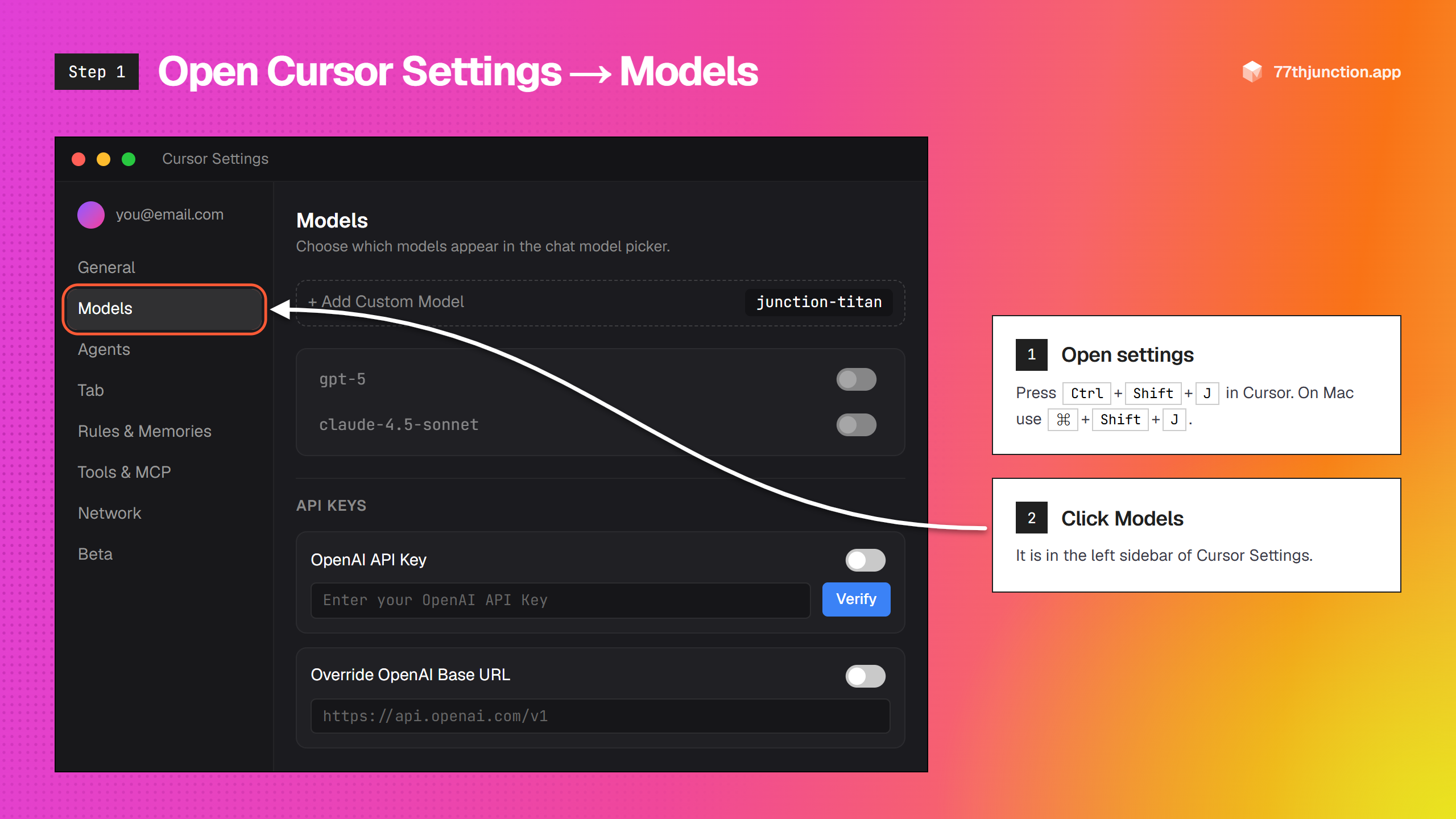
Open Cursor Settings → Models
In Cursor press Ctrl + Shift + J (Mac: ⌘ + Shift + J), or click the gear icon in the top right. Then choose Models in the left sidebar.
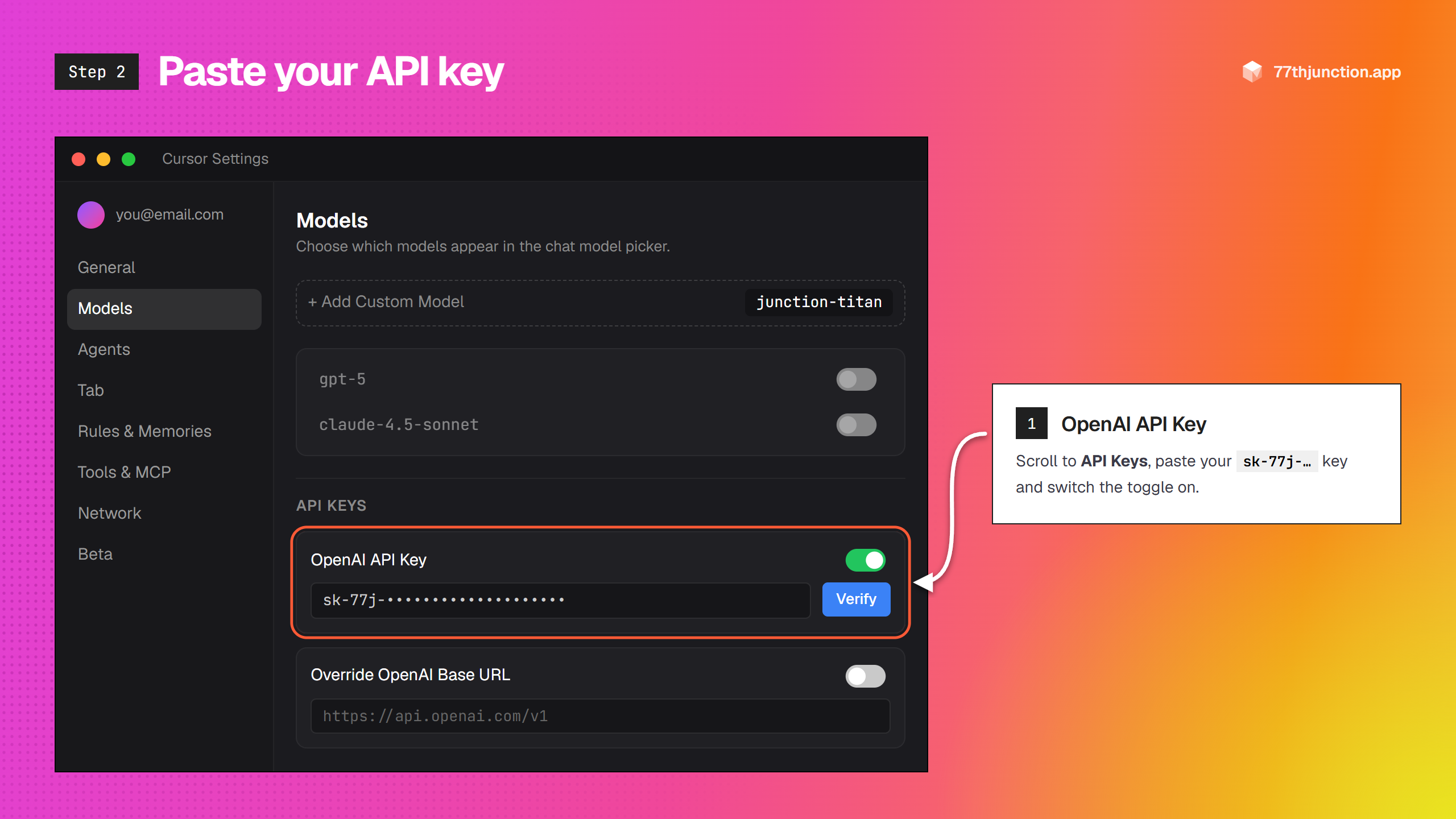
Paste your API key
Scroll down to API Keys. Paste your sk-77j-… key into OpenAI API Key and switch it on.
Override the base URL
Turn on Override OpenAI Base URL and paste:
https://77thjunction.app/v1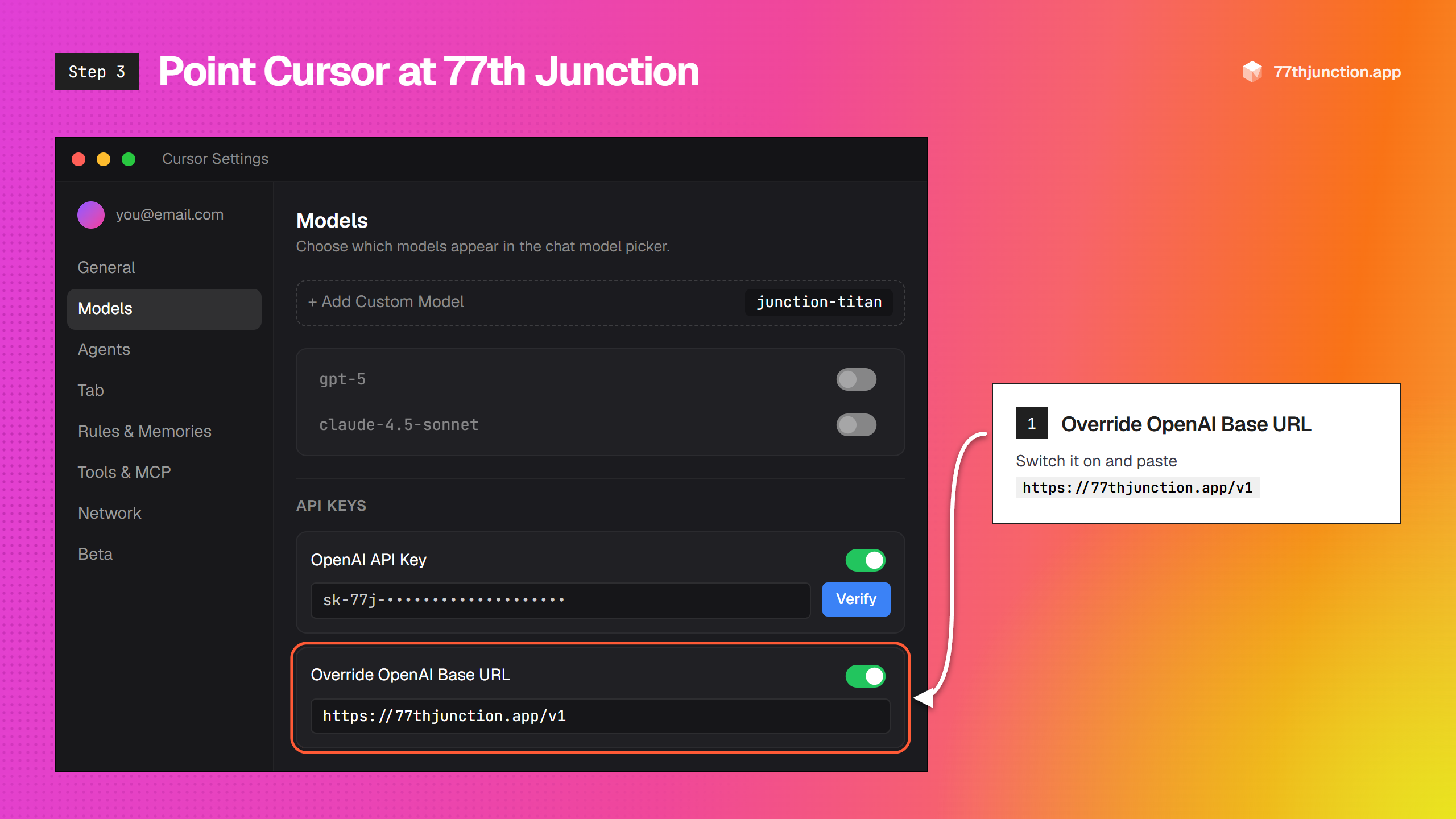
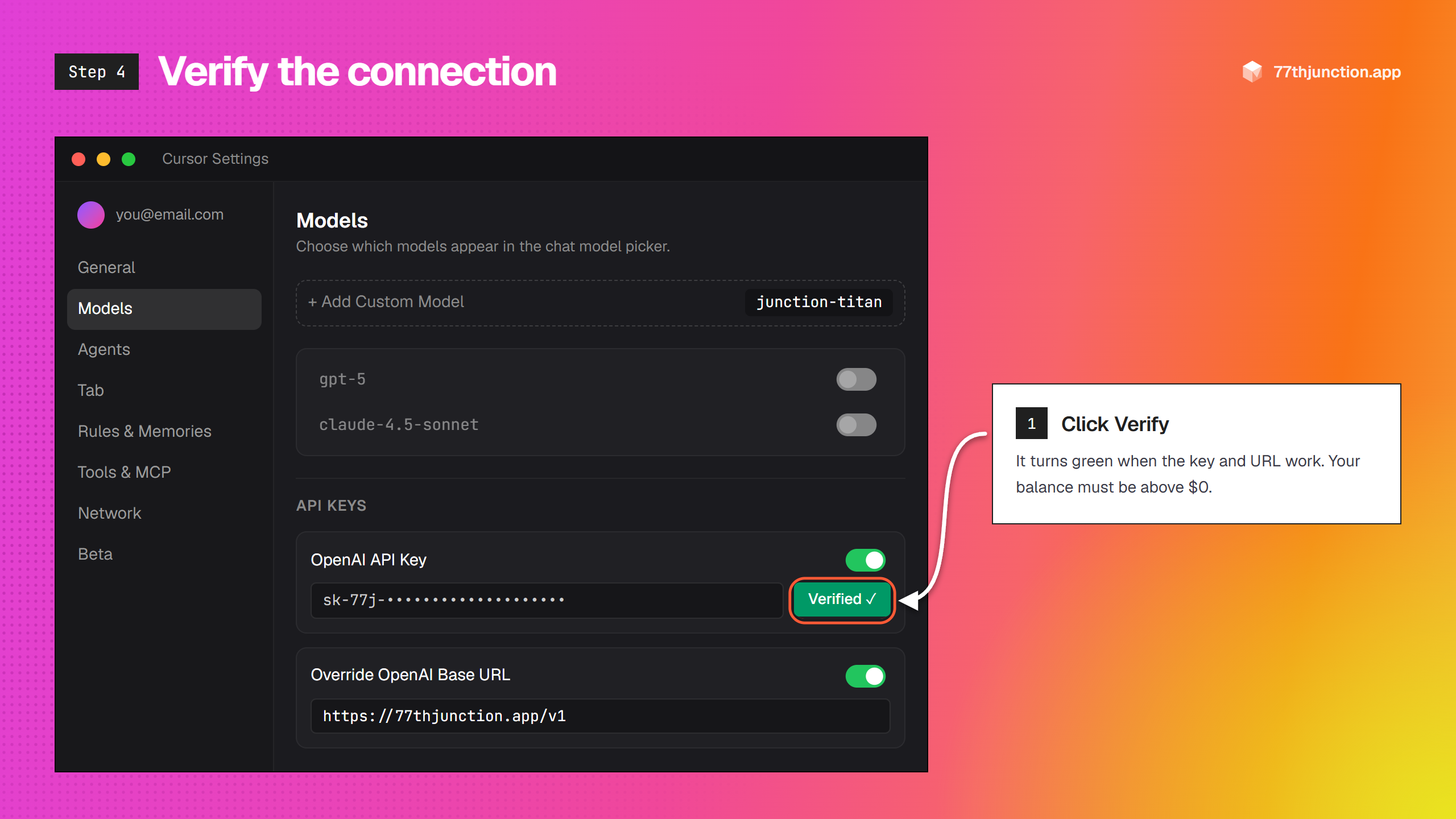
Press Verify
Click Verify next to the key. Cursor sends one tiny test request; when the button turns green, the connection works.
If it fails, check that the URL ends in /v1, that there are no spaces around the key, and that your balance is above zero.
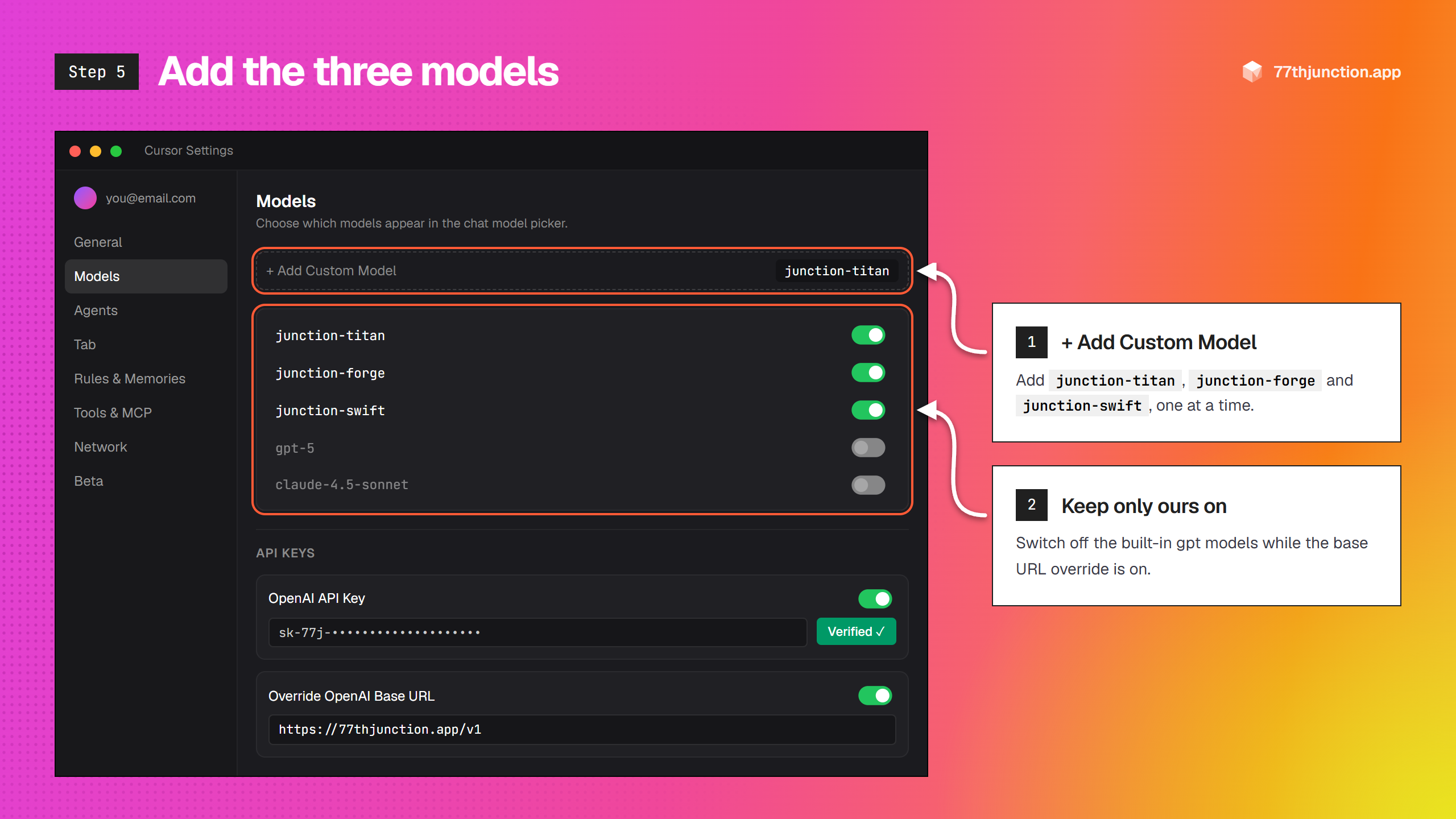
Add the three models
Click + Add Custom Model and add each name exactly as written:
junction-titanjunction-forgejunction-swiftKeep them switched on, and switch off the built-in gpt models while the override is on. Cursor would send those through this URL too.
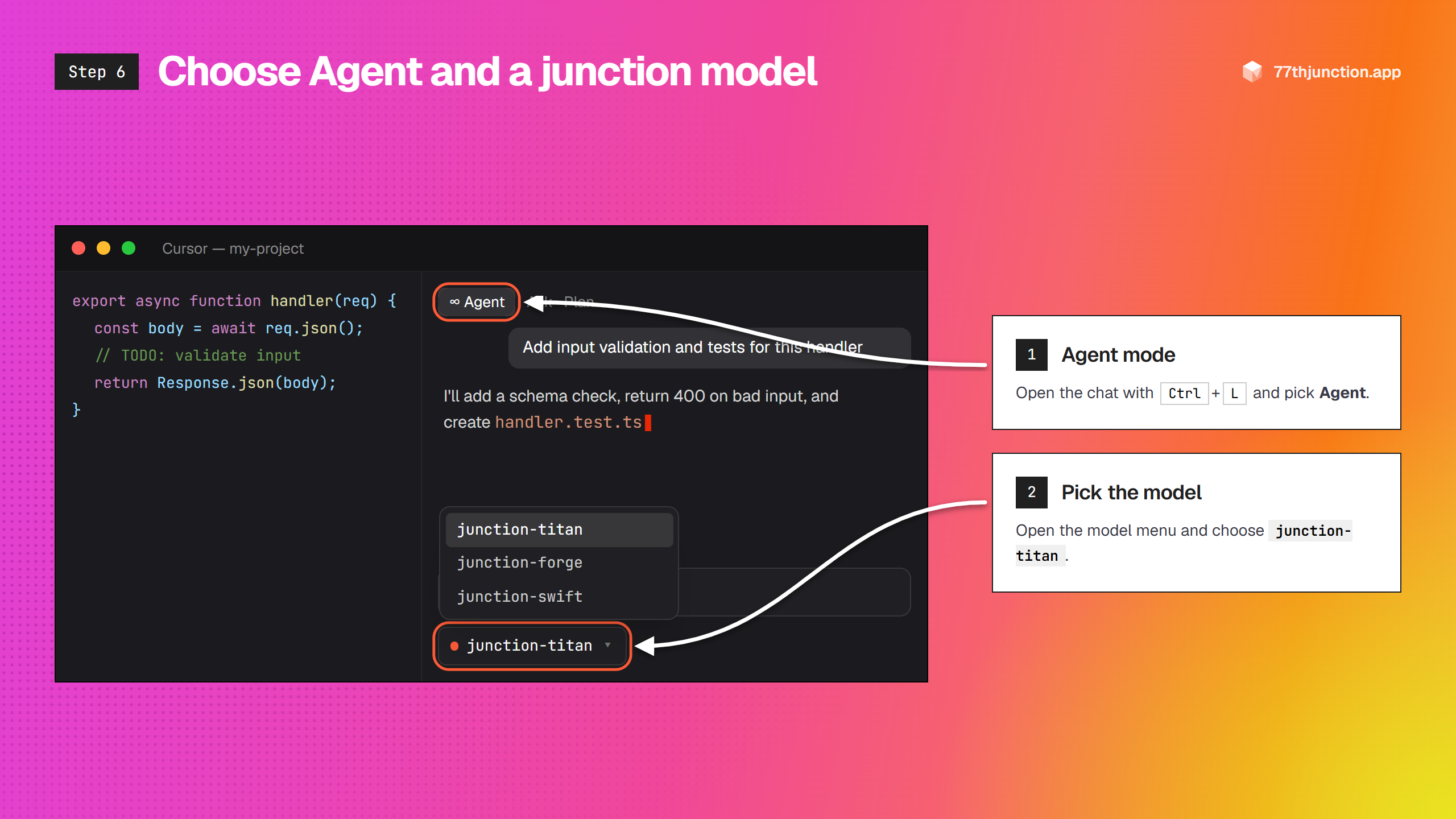
Choose Agent and a junction model
Open the chat with Ctrl + L (Mac: ⌘ + L). Set the mode to Agent, open the model menu under the message box and choose a junction model.
- junction-titan: the strongest model and the best default for Agent mode and multi-file edits.
- junction-forge: the previous large model, same price; a fallback if Titan is busy.
- junction-swift: fast and cheap for questions; can read screenshots you paste.
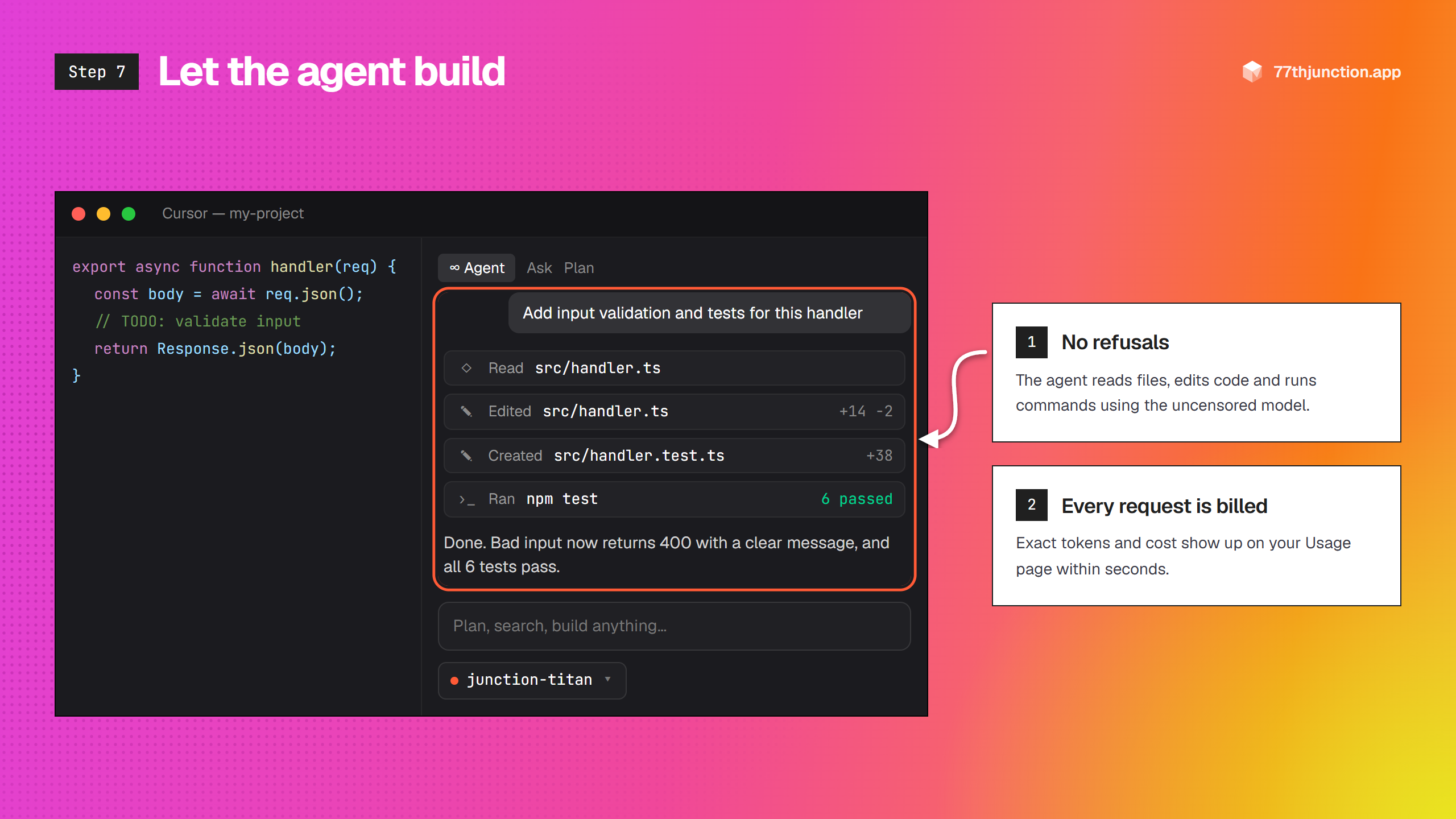
Let the agent build
Describe the task. The agent reads your files, edits code, creates files and runs terminal commands, all with the uncensored model and without stopping to refuse.
Every request shows up on your Usage page within seconds, with its exact tokens and cost.
Pay for what you use
No plans, seats or monthly fee. Top up from $1 and every request is billed for the exact tokens it used.
Top up from $1
M-Pesa STK push, Visa, Mastercard or a PayPal balance. Credit lands in seconds and never expires.
Failed requests are free
You are only charged for replies that complete. Errors and refusals from upstream cost nothing.
Spend limits per key
Give the key you use in Cursor its own cap so an agent loop can never surprise you.
Private by default
We record tokens and cost for billing. Prompts and replies are never stored.
Questions
What does uncensored mean here?+
The models are abliterated: the refusal behaviour was removed from the weights, so they answer directly instead of lecturing. A few hard limits still apply (see the terms): nothing sexual involving minors, no intimate images of real people without consent, and no attacks on systems you do not own.
Does it work in Cursor Agent mode?+
Yes. 77th Junction speaks the OpenAI API, which Cursor supports through “Override OpenAI Base URL”. The models support tool calling, so Agent mode can read files, edit code and run terminal commands with them.
How does billing work?+
Prepaid and pay-as-you-go. Top up from $1 with M-Pesa, card or PayPal. Every request is charged for the exact tokens it used and appears in your usage log with its cost. No subscription, and your balance never expires.
Do you store my prompts?+
Not for API traffic. Requests from Cursor or your own code are logged with token counts, cost and timing for billing only; the prompts and replies pass through and are not saved. Chats in the dashboard playground are saved to your account so you can reopen them, and you can delete them at any time.
Can I use it outside Cursor?+
Anywhere that accepts an OpenAI-compatible endpoint: the OpenAI SDKs, Cline, Continue, Roo Code, LibreChat, Open WebUI, and your own apps and scripts.
Something else? Contact us
No refusals.
Just answers.
One key, three uncensored models, running in Cursor in about three minutes.